Marraskuun 11. päivä pidetään Microsoftilla (Keilaranta 7) Azure DevDays-tapahtuma joka nimensä mukaisesti keskittyy Azure-teknologioiden ympärille (ja nimestään huolimatta on vain yksipäiväinen 
Ohjelma ja ilmoittautuminen täällä.
Marraskuun 11. päivä pidetään Microsoftilla (Keilaranta 7) Azure DevDays-tapahtuma joka nimensä mukaisesti keskittyy Azure-teknologioiden ympärille (ja nimestään huolimatta on vain yksipäiväinen
Ohjelma ja ilmoittautuminen täällä.
A few days ago the Windows Phone version reached 10 000 download mark on the Windows Phone Store!
Thanks for all the users for this unbelievable achievement! There are some open bugs that I will fix at some point. Also, I have a lot of development ideas as well, finding the time to implement them is the harder problem to solve :)
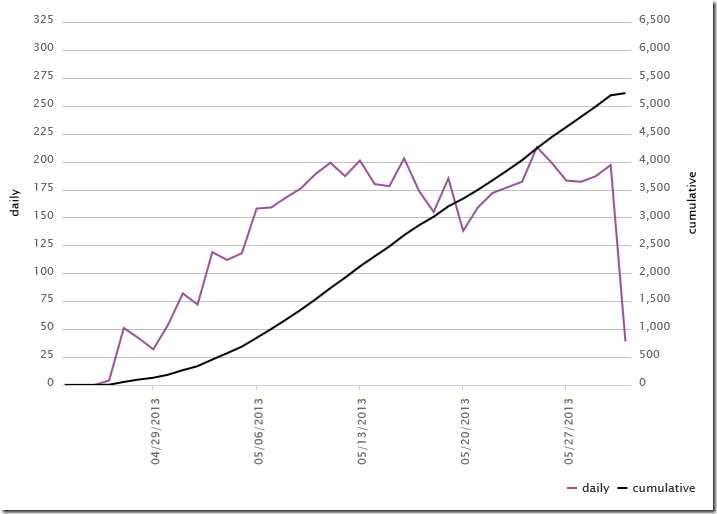
I submitted Photo Location Planner to Windows Phone Store just about a month ago. This weekend the statistics tell me that it has been downloaded from the store over 5000 times! That is way more than I anticipated, although the app is free but it has a fairly limited audience. The download stats look currently like this:
Past few weeks it has been fairly steady at 150-200 downloads per day, which is amazing! I have done very minimal marketing, just a few tweets and blog posts + word of mouth to friends + one post to a local photography forum.
To be honest there is currently at least one case when it seems to crash, stay tuned for an updated version. Many thanks for the individuals who have submitted a crash report via email!
Photo Location Planner in Windows Phone Store.
New features:
Version 1.2 has been available in the store for a few days now.
private static DateTime julianDateToDate(double julianDate)results in an ArgumentOutOfRangeException if the argument julianDate is NaN (which happens when the app logic fails to calculate various twilight times – they cannot be calculated at all at certain times of year and place).
{
DateTime dt = new DateTime(1970, 1, 1);
dt = dt.AddMilliseconds((julianDate + 0.5 - J1970) * msInDay);
return dt;
}
private static DateTime julianDateToDate(double julianDate)The lesson here obviously is: the emulator is not the same thing as the real device. Remember to test your apps on the device as well!
{
if (double.IsNaN(julianDate))
throw new ArgumentOutOfRangeException("julianDate");
DateTime dt = new DateTime(1970, 1, 1);
dt = dt.AddMilliseconds((julianDate + 0.5 - J1970) * msInDay);
return dt;
}
Aalisoftin tekemä Windows 8 –sovellus Photo Location Planner on arvosteltu mBnetin viikon ohjelmat-artikkelina. Jos olet Windows 8-käyttäjä, käy kokeilemassa!
Sovelluksen Windows Phone-versio on lähiaikoina myös saatavilla.
I just submitted a version of my app to Windows Phone marketplace. I thought I’d share some thoughts about publishing apps to Microsoft app stores while the new submission gets certified.
I have already earlier published an app (Photo Location Planner) to Windows 8 Store. Before that submission was possible, I naturally needed to create an account for it. That account is a standard Microsoft account (formerly Live account). I am not sure if it has changed (probably not), but it is important to know that once an app has been submitted, the publisher account cannot be changed. I am not saying that it requires huge efforts on the publisher and is difficult to do. I am saying it is NOT technically possible at all.
While I naturally have more than my fair share of active and semi-active Microsoft accounts already, they have one problem: they are tied to me personally. If I wanted to transfer the maintenance of my apps later to someone else, I would need to hand the account used to submit the app. If I had used that same account for something else than app submissions as well, that would not be a wise thing to do.
Lesson #1: create a separate Microsoft account for app submissions and use it only for submitting apps, nothing else. That way you can share the account details with someone else without worries of breaching security of some other services you may have used with that account.
I created an alias in my Office 365 subscription and created a Microsoft account using that email address. That way I did not have to pay for an additional mailbox but have the benefit of a separate email address for app submissions.
Since I had just founded a company to run my professional life, I created a company account. That lead me to some additional trouble, since Microsoft wants to validate that I legally am allowed to represent my company (which is of course fair in itself).
In practice, they first suggested that I would need to get a signature of public notary to a notary letter. It would have been possible to use also a recent phone bill, but unfortunately my mobile phone is not officially registered to my company and therefore it does not state my company name in the bill. Ok, off to the notary then, I thought. I managed to get a signed notary letter, but with an exception that I wasn’t able to take an oath in the notary as was required in the letter (that would have required a court order, I was told, and is hugely complicated to get!). I sent a copy of the signed letter to Microsoft representative, but that was declined because of the missing oath. Only after this episode did they tell me that I could achieve my goal by just registering my phone number to my company in Fonecta phone directory, which is what they use to check these things. Duh, why didn’t they tell that in the first place! That took 10 minutes and everything was ok after they called me to verify that it was me answering the phone!
Lesson #2: When registering a company account, make sure you have either a recent phone bill that states the company name OR have your phone number registered on the directory Microsoft uses (Fonecta in Finland).
I first thought that I would need to create another account for publishing to Windows Phone marketplace. I proceeded to create the account just as I did with Windows 8 Store, but when I reached the point where it asks for official publisher name (company name), I noticed that my company was already reserved “by someone else”. It occurred to me that maybe that someone else is my Windows 8 Store account. And that was it, after I logged on using the account I had already created and validated earlier in Windows 8 Store, I was immediately good to go with all information about my company already in place! Great stuff!
Lesson #3: You can/should use the same publisher account for both Windows 8 Store and Windows Phone Marketplace.